
For independent retail
Retail point of sale. A little more order, a lot more shop.
Serve the person at the counter. Know what is on the shelf. See how the day went. Zanira brings those everyday jobs together.
Keep the counter moving
Find products by search or barcode, build a basket and record the sale. Held sales let you put a basket aside and recall it when the customer is ready.
Cash checkout works on your configured device without waiting for a cloud connection. Payment integrations have their own connectivity and activation requirements.
- Search and barcode checkout
- Held sales, discounts and receipt history
- Returns and voids with a record of what changed
Take payment the way the customer pays
The payment screen offers the tenders you switch on in settings: cash, M-Pesa, card and on-account sales. A split sale takes part in cash and part by M-Pesa.
Card payments are recorded against the slip reference from your own terminal; Zanira does not process cards. On-account sales create a balance the customer owes, so they need the accounting module.
Prices include VAT. The payment screen and the receipt show the VAT amount inside the total. A discount can be an amount or a percentage, and one above your policy asks for a supervisor PIN.
Stock with a history
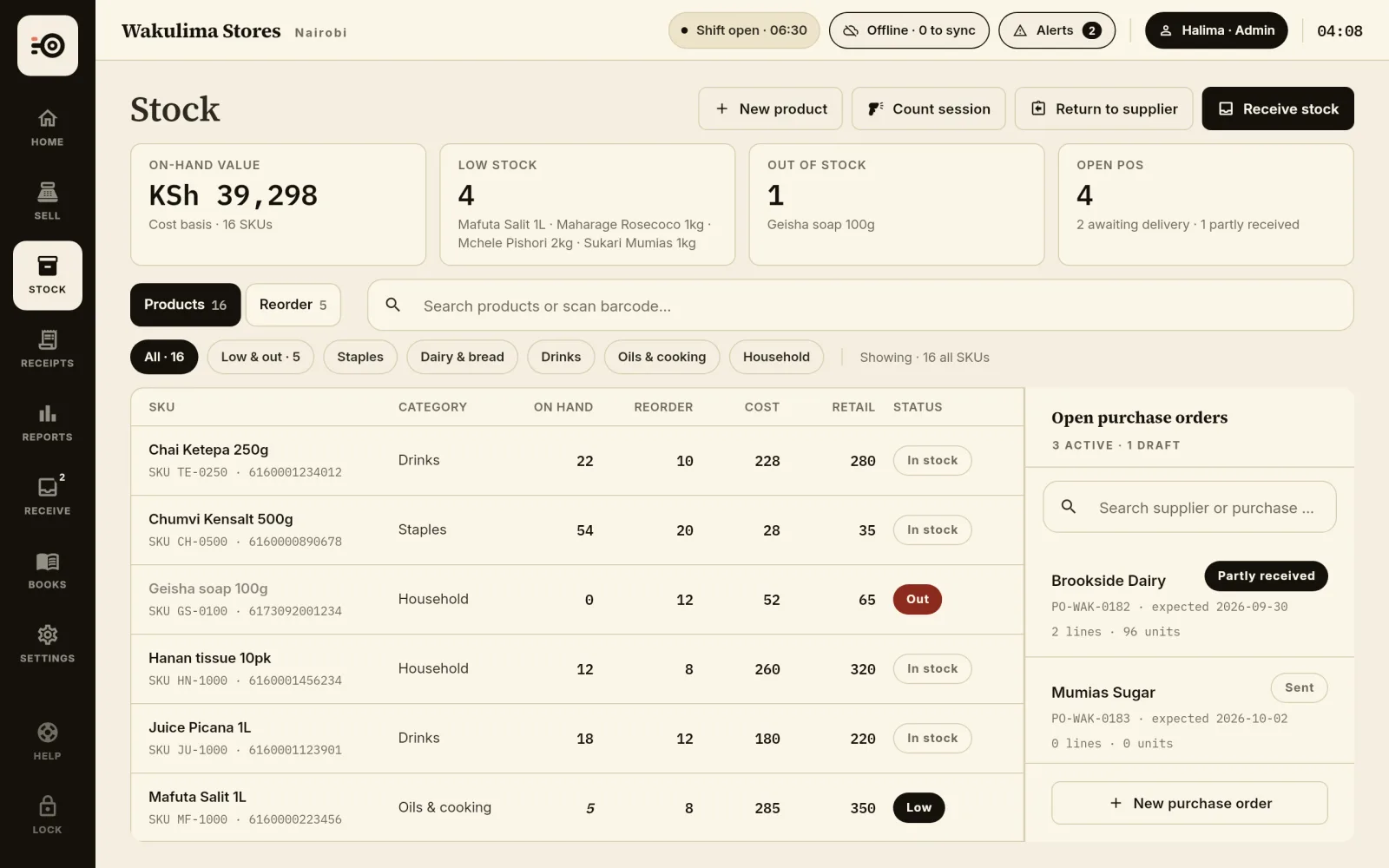
A sale records the movement of the items it contains. Deliveries, counts and adjustments continue that history, so the quantity on screen has a trail behind it.
Organise products by category, each with a barcode, a cost and a retail price. Import a catalogue from CSV, and check pack sizes and prices before opening stock.
Order, receive and count
Raise a purchase order as a draft, mark it sent, and receive against it as deliveries arrive. An order that has come in part shows as partly received. Marking an order sent records its status; Zanira does not email it to the supplier.
A reorder view lists what is low or out. A count session compares the shelf with your records, and a return to supplier takes stock back out. The Stock screen keeps the value of stock on hand, at cost, in view.
- Purchase orders: draft, sent, partly received
- Receive stock and return to supplier
- Count sessions and a reorder list
A shared counter, with clear responsibilities
Set up staff as admin, co-admin, supervisor, cashier, salesperson or viewer. Where a business separates selling from collecting payment, the counter runs in separated mode: sales staff post a prepared sale and the cashier picks it up from the receive queue.
A combined mode lets one person do both. Roles and the counter mode decide who can perform each action.
Open the day, close the day
A shift opens with a count of the cash in the till. It closes with the counted cash, the variance and a reason for it. The Z-report can be exported, printed and signed off.
Reports cover the shift and the day, top sellers, sales by customer, tender mix, cashier performance, demand signals and dead or slow stock. Most export to CSV. Reports on a device reflect the data available there; activity from other devices appears after sync.
Begin with the essentials
Set up your account online, add your catalogue and establish opening stock. Test your scanner and printer with a sample checkout before using the counter for trade.
Zanira is currently available in Kenya. Review the modules and integrations offered for your business during setup.
Good to know.
Can I import products?
Yes. Catalogue import is part of setup, from a CSV file. Review the expected columns, pack sizes, prices and tax settings, and check the import results before starting trade.
Can staff prepare a sale for a cashier?
Yes. In the separated counter workflow, sales staff prepare the sale and a cashier collects payment through the receive queue. Roles and counter setup control who can perform each action.
Does Zanira process card payments?
No. A card sale is recorded with the slip reference from your own card terminal. Zanira does not connect to a card gateway.
Can I print and reprint receipts?
Yes. Receipts print to a thermal printer and can be reprinted from the receipt history. Sending a receipt by SMS is an optional add-on.
Is online-store integration included?
This page describes in-store retail workflows. It does not promise an e-commerce storefront or integrations with online marketplaces.